


Qwopus3.6
Collection
2 items • Updated • 18
As part of the Qwopus series, this release continues the same core direction established in earlier versions: stronger reasoning quality, a more stable answer structure, and less stylistic drift across long-form responses. Instead of introducing a complicated multi-stage design, this preview emphasizes a cleaner and more controlled supervised fine-tuning recipe, with the goal of producing outputs that feel more coherent, deliberate, and aligned across different tasks.
This model was trained using Unsloth, and the full training workflow runs end-to-end successfully in practice. Many thanks to the Unsloth team for building and maintaining such a practical training stack for open-model fine-tuning.
It is designed for:
The current version is trained on a mixed reasoning dataset built primarily from Kassadin88/Claude-Distillation-Dataset, with additional samples drawn from:
Jackrong/Kimi-K2.5-Reasoning-1M-CleanedJackrong/Qwen3.5-reasoning-700xOne of the main challenges in this recipe is that the source models differ substantially in answer tone, reasoning rhythm, and chain-of-thought organization. To reduce that inconsistency, the merged data was further evaluated and cleaned using an 8B instruction model, filtering out samples whose reasoning style deviated too far from the target behavior.
The final curated training set contains roughly 12K examples, with an emphasis on preserving high-quality reasoning traces while keeping the overall output style more coherent across domains.
Qwopus3.6-27B-v1-preview has already gone through a small but practical early evaluation focused on real local-use scenarios. Based on a working evaluation by Kyle Hessling, this preview checkpoint was compared against the Qwen3.6-27B base model on a 16-prompt suite covering agentic reasoning, production-grade front-end design, and creative canvas / WebGL tasks, with inference run through llama.cpp on a single RTX 5090 workstation.
These results should be read as an early directional signal rather than a final claim. The current report evaluates the
v1-previewcheckpoint only, while a larger and cleaner full-scale training run is still in progress.


For a more detailed write-up, see the accompanying evaluation report.
I am continuing to train the Qwopus3.6 series together with Kyle Hessling, with ongoing work focused on larger-scale runs, more data, and broader training strategies.
This checkpoint is an early preview rather than the final form of the Qwopus3.6 line. Larger-scale training is already underway, and the model is still being actively trained. New follow-up versions based on more data and broader experiments are expected in the near future. You can also connect with him directly on X (Kyle Hessling), follow his updates there, and check out his Hugging Face work at KyleHessling1. Stay tuned.
The following content introduces the underlying base model, Qwen3.6-27B, which serves as the foundation for this release.

This repository contains model weights and configuration files for the post-trained model in the Hugging Face Transformers format.
These artifacts are compatible with Hugging Face Transformers, vLLM, SGLang, KTransformers, etc.
The following sections summarize the original Qwen3.6-27B base model architecture and reference material that this preview release builds upon.
This release delivers substantial upgrades, particularly in
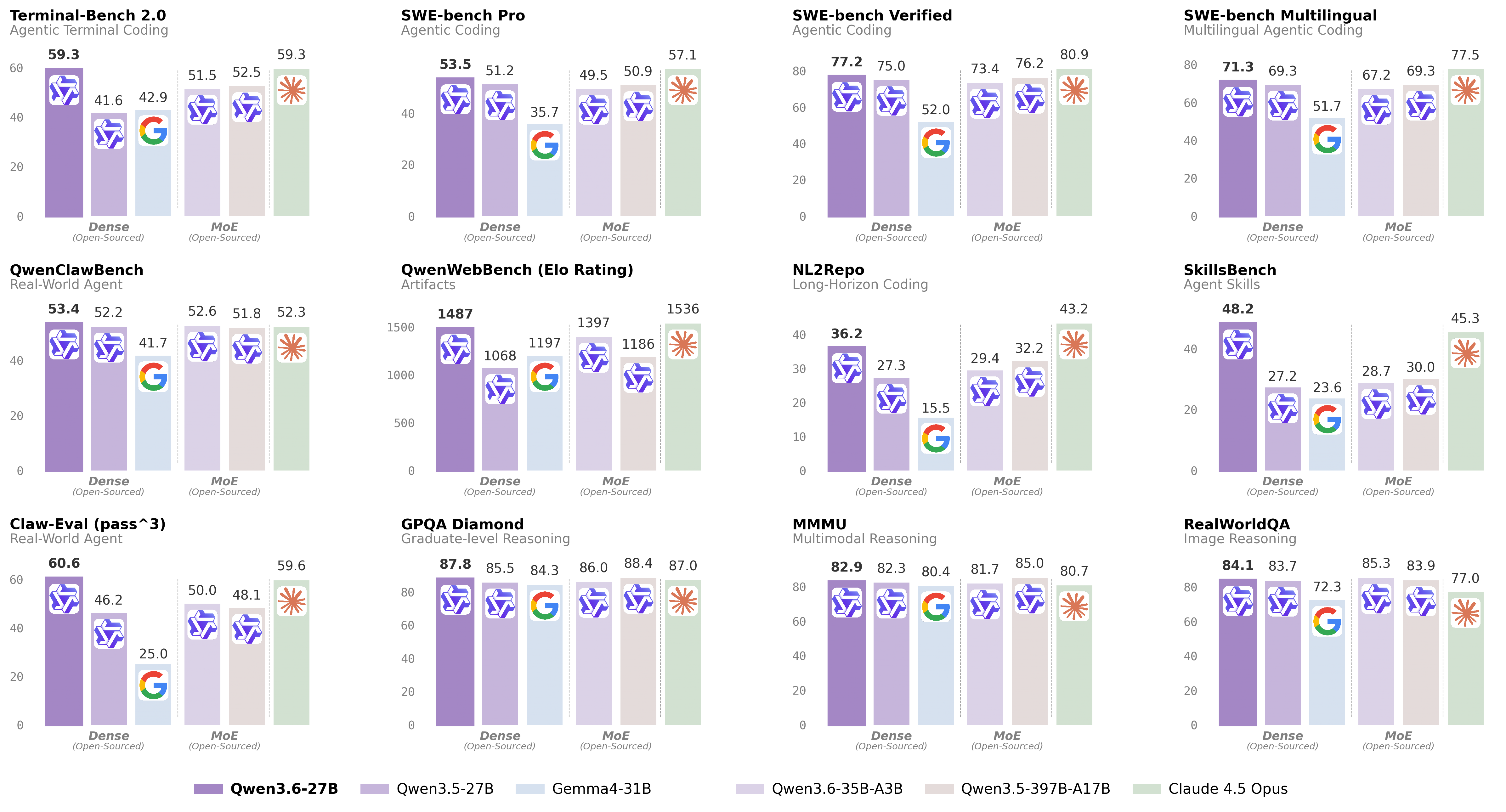
For more details, please refer to our blog post Qwen3.6-27B.
| Qwen3.5-27B | Qwen3.5-397B-A17B | Gemma4-31B | Claude 4.5 Opus | Qwen3.6-35B-A3B | Qwen3.6-27B | |
|---|---|---|---|---|---|---|
| Coding Agent | ||||||
| SWE-bench Verified | 75.0 | 76.2 | 52.0 | 80.9 | 73.4 | 77.2 |
| SWE-bench Pro | 51.2 | 50.9 | 35.7 | 57.1 | 49.5 | 53.5 |
| SWE-bench Multilingual | 69.3 | 69.3 | 51.7 | 77.5 | 67.2 | 71.3 |
| Terminal-Bench 2.0 | 41.6 | 52.5 | 42.9 | 59.3 | 51.5 | 59.3 |
| SkillsBench Avg5 | 27.2 | 30.0 | 23.6 | 45.3 | 28.7 | 48.2 |
| QwenWebBench | 1068 | 1186 | 1197 | 1536 | 1397 | 1487 |
| NL2Repo | 27.3 | 32.2 | 15.5 | 43.2 | 29.4 | 36.2 |
| Claw-Eval Avg | 64.3 | 70.7 | 48.5 | 76.6 | 68.7 | 72.4 |
| Claw-Eval Pass^3 | 46.2 | 48.1 | 25.0 | 59.6 | 50.0 | 60.6 |
| QwenClawBench | 52.2 | 51.8 | 41.7 | 52.3 | 52.6 | 53.4 |
| Knowledge | ||||||
| MMLU-Pro | 86.1 | 87.8 | 85.2 | 89.5 | 85.2 | 86.2 |
| MMLU-Redux | 93.2 | 94.9 | 93.7 | 95.6 | 93.3 | 93.5 |
| SuperGPQA | 65.6 | 70.4 | 65.7 | 70.6 | 64.7 | 66.0 |
| C-Eval | 90.5 | 93.0 | 82.6 | 92.2 | 90.0 | 91.4 |
| STEM & Reasoning | ||||||
| GPQA Diamond | 85.5 | 88.4 | 84.3 | 87.0 | 86.0 | 87.8 |
| HLE | 24.3 | 28.7 | 19.5 | 30.8 | 21.4 | 24.0 |
| LiveCodeBench v6 | 80.7 | 83.6 | 80.0 | 84.8 | 80.4 | 83.9 |
| HMMT Feb 25 | 92.0 | 94.8 | 88.7 | 92.9 | 90.7 | 93.8 |
| HMMT Nov 25 | 89.8 | 92.7 | 87.5 | 93.3 | 89.1 | 90.7 |
| HMMT Feb 26 | 84.3 | 87.9 | 77.2 | 85.3 | 83.6 | 84.3 |
| IMOAnswerBench | 79.9 | 80.9 | 74.5 | 84.0 | 78.9 | 80.8 |
| AIME26 | 92.6 | 93.3 | 89.2 | 95.1 | 92.7 | 94.1 |
* SWE-Bench Series: Internal agent scaffold (bash + file-edit tools); temp=1.0, top_p=0.95, 200K context window. We correct some problematic tasks in the public set of SWE-bench Pro and evaluate all baselines on the refined benchmark.
* Terminal-Bench 2.0: Harbor/Terminus-2 harness; 3h timeout, 32 CPU/48 GB RAM; temp=1.0, top_p=0.95, top_k=20, max_tokens=80K, 256K ctx; avg of 5 runs.
* SkillsBench: Evaluated via OpenCode on 78 tasks (self-contained subset, excluding API-dependent tasks); avg of 5 runs.
* NL2Repo: Others are evaluated via Claude Code (temp=1.0, top_p=0.95, max_turns=900).
* QwenClawBench: A real-user-distribution Claw agent benchmark; temp=0.6, 256K ctx.
* QwenWebBench: An internal front-end code generation benchmark; bilingual (EN/CN), 7 categories (Web Design, Web Apps, Games, SVG, Data Visualization, Animation, and 3D); auto-render + multimodal judge (code/visual correctness); BT/Elo rating system.
* AIME 26: We use the full AIME 2026 (I & II), where the scores may differ from Qwen 3.5 notes.
| Qwen3.5-27B | Qwen3.5-397B-A17B | Gemma4-31B | Claude 4.5 Opus | Qwen3.6-35B-A3B | Qwen3.6-27B | |
|---|---|---|---|---|---|---|
| STEM & Puzzle | ||||||
| MMMU | 82.3 | 85.0 | 80.4 | 80.7 | 81.7 | 82.9 |
| MMMU-Pro | 75.0 | 79.0 | 76.9 | 70.6 | 75.3 | 75.8 |
| MathVista mini | 87.8 | -- | 79.3 | -- | 86.4 | 87.4 |
| DynaMath | 87.7 | 86.3 | 79.5 | 79.7 | 82.8 | 85.6 |
| VlmsAreBlind | 96.9 | -- | 87.2 | -- | 96.6 | 97.0 |
| General VQA | ||||||
| RealWorldQA | 83.7 | 83.9 | 72.3 | 77.0 | 85.3 | 84.1 |
| MMStar | 81.0 | 83.8 | 77.3 | 73.2 | 80.7 | 81.4 |
| MMBenchEN-DEV-v1.1 | 92.6 | -- | 90.9 | -- | 92.8 | 92.3 |
| SimpleVQA | 56.0 | 67.1 | 52.9 | 65.7 | 58.9 | 56.1 |
| Document Understanding | ||||||
| CharXiv RQ | 79.5 | 80.8 | 67.9 | 68.5 | 78.0 | 78.4 |
| CC-OCR | 81.0 | 82.0 | 75.7 | 76.9 | 81.9 | 81.2 |
| OCRBench | 89.4 | -- | 86.1 | -- | 90.0 | 89.4 |
| Spatial Intelligence | ||||||
| ERQA | 60.5 | 67.5 | 57.5 | 46.8 | 61.8 | 62.5 |
| CountBench | 97.8 | 97.2 | 96.1 | 90.6 | 96.1 | 97.8 |
| RefCOCO avg | 90.9 | 92.3 | -- | -- | 92.0 | 92.5 |
| EmbSpatialBench | 84.5 | -- | -- | -- | 84.3 | 84.6 |
| RefSpatialBench | 67.7 | -- | 4.7 | -- | 64.3 | 70.0 |
| Video Understanding | ||||||
| VideoMME(w sub.) | 87.0 | 87.5 | -- | 77.7 | 86.6 | 87.7 |
| VideoMMMU | 82.3 | 84.7 | 81.6 | 84.4 | 83.7 | 84.4 |
| MLVU | 85.9 | 86.7 | -- | 81.7 | 86.2 | 86.6 |
| MVBench | 74.6 | 77.6 | -- | 67.2 | 74.6 | 75.5 |
| Visual Agent | ||||||
| V* | 93.7 | 95.8 | -- | 67.0 | 90.1 | 94.7 |
| AndroidWorld | 64.2 | -- | -- | -- | -- | 70.3 |
* Empty cells (--) indicate scores not yet available or not applicable.
For streamlined integration, we recommend using Qwen3.6 via APIs. Below is a guide to use Qwen3.6 via OpenAI-compatible API.
Qwen3.6 can be served via APIs with popular inference frameworks. In the following, we show example commands to launch OpenAI-Compatible API servers for Qwen3.6 models.
Inference efficiency and throughput vary significantly across frameworks. We recommend using the latest framework versions to ensure optimal performance and compatibility. For production workloads or high-throughput scenarios, dedicated serving engines such as SGLang, KTransformers or vLLM are strongly recommended.
The model has a default context length of 262,144 tokens. If you encounter out-of-memory (OOM) errors, consider reducing the context window. However, because Qwen3.6 leverages extended context for complex tasks, we advise maintaining a context length of at least 128K tokens to preserve thinking capabilities.
SGLang is a fast serving framework for large language models and vision language models.
sglang>=0.5.10 is recommended for Qwen3.6, which can be installed using the following command in a fresh environment:
uv pip install sglang[all]
See its documentation for more details.
The following will create API endpoints at http://localhost:8000/v1:
Standard Version: The following command can be used to create an API endpoint with maximum context length 262,144 tokens using tensor parallel on 8 GPUs.
python -m sglang.launch_server --model-path Qwen/Qwen3.6-27B --port 8000 --tp-size 8 --mem-fraction-static 0.8 --context-length 262144 --reasoning-parser qwen3
Tool Use: To support tool use, you can use the following command.
python -m sglang.launch_server --model-path Qwen/Qwen3.6-27B --port 8000 --tp-size 8 --mem-fraction-static 0.8 --context-length 262144 --reasoning-parser qwen3 --tool-call-parser qwen3_coder
Multi-Token Prediction (MTP): The following command is recommended for MTP:
python -m sglang.launch_server --model-path Qwen/Qwen3.6-27B --port 8000 --tp-size 8 --mem-fraction-static 0.8 --context-length 262144 --reasoning-parser qwen3 --speculative-algo NEXTN --speculative-num-steps 3 --speculative-eagle-topk 1 --speculative-num-draft-tokens 4
For detailed deployment guide, see the SGLang Qwen3.5 Cookbook.
vLLM is a high-throughput and memory-efficient inference and serving engine for LLMs.
vllm>=0.19.0 is recommended for Qwen3.6, which can be installed using the following command in a fresh environment:
uv pip install vllm --torch-backend=auto
See its documentation for more details.
The following will create API endpoints at http://localhost:8000/v1:
Standard Version: The following command can be used to create an API endpoint with maximum context length 262,144 tokens using tensor parallel on 8 GPUs.
vllm serve Qwen/Qwen3.6-27B --port 8000 --tensor-parallel-size 8 --max-model-len 262144 --reasoning-parser qwen3
Tool Call: To support tool use, you can use the following command.
vllm serve Qwen/Qwen3.6-27B --port 8000 --tensor-parallel-size 8 --max-model-len 262144 --reasoning-parser qwen3 --enable-auto-tool-choice --tool-call-parser qwen3_coder
Multi-Token Prediction (MTP): The following command is recommended for MTP:
vllm serve Qwen/Qwen3.6-27B --port 8000 --tensor-parallel-size 8 --max-model-len 262144 --reasoning-parser qwen3 --speculative-config '{"method":"qwen3_next_mtp","num_speculative_tokens":2}'
Text-Only: The following command skips the vision encoder and multimodal profiling to free up memory for additional KV cache:
vllm serve Qwen/Qwen3.6-27B --port 8000 --tensor-parallel-size 8 --max-model-len 262144 --reasoning-parser qwen3 --language-model-only
For detailed deployment guide, see the vLLM Qwen3.5 Recipe.
KTransformers is a flexible framework for experiencing cutting-edge LLM inference optimizations with CPU-GPU heterogeneous computing. For running Qwen3.6 with KTransformers, see the KTransformers Deployment Guide.
Hugging Face Transformers contains a lightweight server which can be used for quick testing and moderate load deployment.
The latest transformers is required for Qwen3.6:
pip install "transformers[serving]"
See its documentation for more details. Please also make sure torchvision and pillow are installed.
Then, run transformers serve to launch a server with API endpoints at http://localhost:8000/v1; it will place the model on accelerators if available:
transformers serve Qwen/Qwen3.6-27B --port 8000 --continuous-batching
The chat completions API is accessible via standard HTTP requests or OpenAI SDKs. Here, we show examples using the OpenAI Python SDK.
Before starting, make sure it is installed and the API key and the API base URL is configured, e.g.:
pip install -U openai

# Set the following accordingly
export OPENAI_BASE_URL="http://localhost:8000/v1"
export OPENAI_API_KEY="EMPTY"
We recommend using the following set of sampling parameters for generation
- Thinking mode for general tasks:
temperature=1.0, top_p=0.95, top_k=20, min_p=0.0, presence_penalty=0.0, repetition_penalty=1.0- Thinking mode for precise coding tasks (e.g. WebDev):
temperature=0.6, top_p=0.95, top_k=20, min_p=0.0, presence_penalty=0.0, repetition_penalty=1.0- Instruct (or non-thinking) mode:
temperature=0.7, top_p=0.80, top_k=20, min_p=0.0, presence_penalty=1.5, repetition_penalty=1.0Please note that the support for sampling parameters varies according to inference frameworks.
Qwen3.6 models operate in thinking mode by default, generating thinking content signified by
<think>\n...</think>\n\nbefore producing the final responses. To disable thinking content and obtain direct response, refer to the examples here.
from openai import OpenAI
# Configured by environment variables
client = OpenAI()

messages = [
    {"role": "user", "content": "Type \"I love Qwen3.6\" backwards"},
]

chat_response = client.chat.completions.create(
    model="Qwen/Qwen3.6-27B",
    messages=messages,
    max_tokens=81920,
    temperature=1.0,
    top_p=0.95,
    presence_penalty=0.0,
    extra_body={
        "top_k": 20,
    },
)
print("Chat response:", chat_response)
from openai import OpenAI
# Configured by environment variables
client = OpenAI()

messages = [
    {
        "role": "user",
        "content": [
            {
                "type": "image_url",
                "image_url": {
                    "url": "https://qianwen-res.oss-accelerate.aliyuncs.com/Qwen3.5/demo/CI_Demo/mathv-1327.jpg"
                }
            },
            {
                "type": "text",
                "text": "The centres of the four illustrated circles are in the corners of the square. The two big circles touch each other and also the two little circles. With which factor do you have to multiply the radii of the little circles to obtain the radius of the big circles?\nChoices:\n(A) $\\frac{2}{9}$\n(B) $\\sqrt{5}$\n(C) $0.8 \\cdot \\pi$\n(D) 2.5\n(E) $1+\\sqrt{2}$"
            }
        ]
    }
]

response = client.chat.completions.create(
    model="Qwen/Qwen3.6-27B",
    messages=messages,
    max_tokens=81920,
    temperature=1.0,
    top_p=0.95,
    presence_penalty=0.0,
    extra_body={
        "top_k": 20,
    },
)
print("Chat response:", chat_response)
from openai import OpenAI
# Configured by environment variables
client = OpenAI()

messages = [
    {
        "role": "user",
        "content": [
            {
                "type": "video_url",
                "video_url": {
                    "url": "https://qianwen-res.oss-accelerate.aliyuncs.com/Qwen3.5/demo/video/N1cdUjctpG8.mp4"
                }
            },
            {
                "type": "text",
                "text": "How many porcelain jars were discovered in the niches located in the primary chamber of the tomb?"
            }
        ]
    }
]

# When vLLM is launched with `--media-io-kwargs '{"video": {"num_frames": -1}}'`,
# video frame sampling can be configured via `extra_body` (e.g., by setting `fps`).
# This feature is currently supported only in vLLM.
#
# By default, `fps=2` and `do_sample_frames=True`.
# With `do_sample_frames=True`, you can customize the `fps` value to set your desired video sampling rate.
response = client.chat.completions.create(
    model="Qwen/Qwen3.6-27B",
    messages=messages,
    max_tokens=81920,
    temperature=1.0,
    top_p=0.95,
    presence_penalty=0.0,
    extra_body={
        "top_k": 20,
        "mm_processor_kwargs": {"fps": 2, "do_sample_frames": True},
    },
)

print("Chat response:", chat_response)
Qwen3.6 does not officially support the soft switch of Qwen3, i.e.,
/thinkand/nothink.
Qwen3.6 will think by default before response. You can obtain direct response from the model without thinking by configuring the API parameters. For example,
from openai import OpenAI
# Configured by environment variables
client = OpenAI()

messages = [
    {
        "role": "user",
        "content": [
            {
                "type": "image_url",
                "image_url": {
                    "url": "https://qianwen-res.oss-accelerate.aliyuncs.com/Qwen3.6/demo/RealWorld/RealWorld-04.png"
                }
            },
            {
                "type": "text",
                "text": "Where is this?"
            }
        ]
    }
]

chat_response = client.chat.completions.create(
    model="Qwen/Qwen3.6-27B",
    messages=messages,
    max_tokens=32768,
    temperature=0.7,
    top_p=0.8,
    presence_penalty=1.5,
    extra_body={
        "top_k": 20,
        "chat_template_kwargs": {"enable_thinking": False},
    },
)
print("Chat response:", chat_response)
If you are using APIs from Alibaba Cloud Model Studio, in addition to changing
model, please use"enable_thinking": Falseinstead of"chat_template_kwargs": {"enable_thinking": False}.
By default, only the thinking blocks generated in handling the latest user message is retained, resulting in a pattern commonly as interleaved thinking.
Qwen3.6 has been additionally trained to preserve and leverage thinking traces from historical messages.
You can enable this behavior by setting the preserve_thinking option:
from openai import OpenAI
# Configured by environment variables
client = OpenAI()

messages = [...]

chat_response = client.chat.completions.create(
    model="Qwen/Qwen3.6-27B",
    messages=messages,
    max_tokens=32768,
    temperature=0.6,
    top_p=0.95,
    presence_penalty=0.0,
    extra_body={
        "top_k": 20,
        "chat_template_kwargs": {"preserve_thinking": True},
    },
)
print("Chat response:", chat_response)
If you are using APIs from Alibaba Cloud Model Studio, in addition to changing
model, please use"preserve_thinking": Trueinstead of"chat_template_kwargs": {"preserve_thinking": False}.
This capability is particularly beneficial for agent scenarios, where maintaining full reasoning context can enhance decision consistency and, in many cases, reduce overall token consumption by minimizing redundant reasoning. Additionally, it can improve KV cache utilization, optimizing inference efficiency in both thinking and non-thinking modes.
Qwen3.6 excels in tool calling capabilities.
We recommend using Qwen-Agent to quickly build Agent applications with Qwen3.6.
To define the available tools, you can use the MCP configuration file, use the integrated tool of Qwen-Agent, or integrate other tools by yourself.
import os
from qwen_agent.agents import Assistant

# Define LLM
# Using Alibaba Cloud Model Studio
llm_cfg = {
    # Use the OpenAI-compatible model service provided by DashScope:
    'model': 'qwen3.6-27b',
    'model_type': 'qwenvl_oai',
    'model_server': 'https://dashscope.aliyuncs.com/compatible-mode/v1',
    'api_key': os.getenv('DASHSCOPE_API_KEY'),

    'generate_cfg': {
        'use_raw_api': True,
        # When using Dash Scope OAI API, pass the parameter of whether to enable thinking mode in this way
        'extra_body': {
            'enable_thinking': True,
            'preserve_thinking': True,
        },
    },
}

# Using OpenAI-compatible API endpoint.
# functionality of the deployment frameworks and let Qwen-Agent automate the related operations.
#
# llm_cfg = {
#     # Use your own model service compatible with OpenAI API by vLLM/SGLang:
#     'model': 'Qwen/Qwen3.6-27B',
#     'model_type': 'qwenvl_oai',
#     'model_server': 'http://localhost:8000/v1',  # api_base
#     'api_key': 'EMPTY',
#
#     'generate_cfg': {
#         'use_raw_api': True,
#         # When using vLLM/SGLang OAI API, pass the parameter of whether to enable thinking mode in this way
#         'extra_body': {
#             'chat_template_kwargs': {'enable_thinking': True, 'preserve_thinking': True}
#         },
#     },
# }

# Define Tools
tools = [
    {'mcpServers': {  # You can specify the MCP configuration file
            "filesystem": {
                "command": "npx",
                "args": ["-y", "@modelcontextprotocol/server-filesystem", "/Users/xxxx/Desktop"]
            }
        }
    }
]

# Define Agent
bot = Assistant(llm=llm_cfg, function_list=tools)

# Streaming generation
messages = [{'role': 'user', 'content': 'Help me organize my desktop.'}]
for responses in bot.run(messages=messages):
    pass
print(responses)

# Streaming generation
messages = [{'role': 'user', 'content': 'Develop a dog website and save it on the desktop'}]
for responses in bot.run(messages=messages):
    pass
print(responses)
Qwen Code is an open-source AI agent for the terminal, optimized for Qwen models. It helps you understand large codebases, automate tedious work, and ship faster.
For more information, please refer to Qwen Code.
Qwen3.6 natively supports context lengths of up to 262,144 tokens. For long-horizon tasks where the total length (including both input and output) exceeds this limit, we recommend using RoPE scaling techniques to handle long texts effectively., e.g., YaRN.
YaRN is currently supported by several inference frameworks, e.g., transformers, vllm, ktransformers and sglang.
In general, there are two approaches to enabling YaRN for supported frameworks:
Modifying the model configuration file:
In the config.json file, change the rope_parameters fields in text_config to:
{
    "mrope_interleaved": true,
    "mrope_section": [
        11,
        11,
        10
    ],
    "rope_type": "yarn",
    "rope_theta": 10000000,
    "partial_rotary_factor": 0.25,
    "factor": 4.0,
    "original_max_position_embeddings": 262144,
}
Passing command line arguments:
For vllm, you can use
VLLM_ALLOW_LONG_MAX_MODEL_LEN=1 vllm serve ... --hf-overrides '{"text_config": {"rope_parameters": {"mrope_interleaved": true, "mrope_section": [11, 11, 10], "rope_type": "yarn", "rope_theta": 10000000, "partial_rotary_factor": 0.25, "factor": 4.0, "original_max_position_embeddings": 262144}}}' --max-model-len 1010000
For sglang and ktransformers, you can use
SGLANG_ALLOW_OVERWRITE_LONGER_CONTEXT_LEN=1 python -m sglang.launch_server ... --json-model-override-args '{"text_config": {"rope_parameters": {"mrope_interleaved": true, "mrope_section": [11, 11, 10], "rope_type": "yarn", "rope_theta": 10000000, "partial_rotary_factor": 0.25, "factor": 4.0, "original_max_position_embeddings": 262144}}}' --context-length 1010000
All the notable open-source frameworks implement static YaRN, which means the scaling factor remains constant regardless of input length, potentially impacting performance on shorter texts. We advise modifying the
rope_parametersconfiguration only when processing long contexts is required. It is also recommended to modify thefactoras needed. For example, if the typical context length for your application is 524,288 tokens, it would be better to setfactoras 2.0.
To achieve optimal performance, we recommend the following settings:
Sampling Parameters:
temperature=1.0, top_p=0.95, top_k=20, min_p=0.0, presence_penalty=0.0, repetition_penalty=1.0 temperature=0.6, top_p=0.95, top_k=20, min_p=0.0, presence_penalty=0.0, repetition_penalty=1.0 temperature=0.7, top_p=0.80, top_k=20, min_p=0.0, presence_penalty=1.5, repetition_penalty=1.0presence_penalty parameter between 0 and 2 to reduce endless repetitions. However, using a higher value may occasionally result in language mixing and a slight decrease in model performance.Adequate Output Length: We recommend using an output length of 32,768 tokens for most queries. For benchmarking on highly complex problems, such as those found in math and programming competitions, we suggest setting the max output length to 81,920 tokens. This provides the model with sufficient space to generate detailed and comprehensive responses, thereby enhancing its overall performance.
Standardize Output Format: We recommend using prompts to standardize model outputs when benchmarking.
answer field with only the choice letter, e.g., "answer": "C"."Long Video Understanding: To optimize inference efficiency for plain text and images, the size parameter in the released video_preprocessor_config.json is conservatively configured. It is recommended to set the longest_edge parameter in the video_preprocessor_config file to 469,762,048 (corresponding to 224k video tokens) to enable higher frame-rate sampling for hour-scale videos and thereby achieve superior performance. For example,
{"longest_edge": 469762048, "shortest_edge": 4096}
Alternatively, override the default values via engine startup parameters. For implementation details, refer to: vLLM / SGLang.
If you find our work helpful, feel free to give us a cite.
@misc{qwen3.6-27b,
    title  = {{Qwen3.6-27B}: Flagship-Level Coding in a {27B} Dense Model},
    author = {{Qwen Team}},
    month  = {April},
    year   = {2026},
    url    = {https://qwen.ai/blog?id=qwen3.6-27b}
}